
“My website is live… I’ve published content… but still no impressions. What’s going wrong?”
Yes!!! Seeing zero impressions for weeks can feel discouraging, especially after spending hours writing content. Many website owners immediately think their website is broken or that Google is ignoring them completely.
But here is not the complete truth:
This is usually not random.
Mostly in many cases, it may come down to a few very specific issues.
As below, I will share my experience with my articles not getting indexed and how I fixed the issues. I will also explain to you.
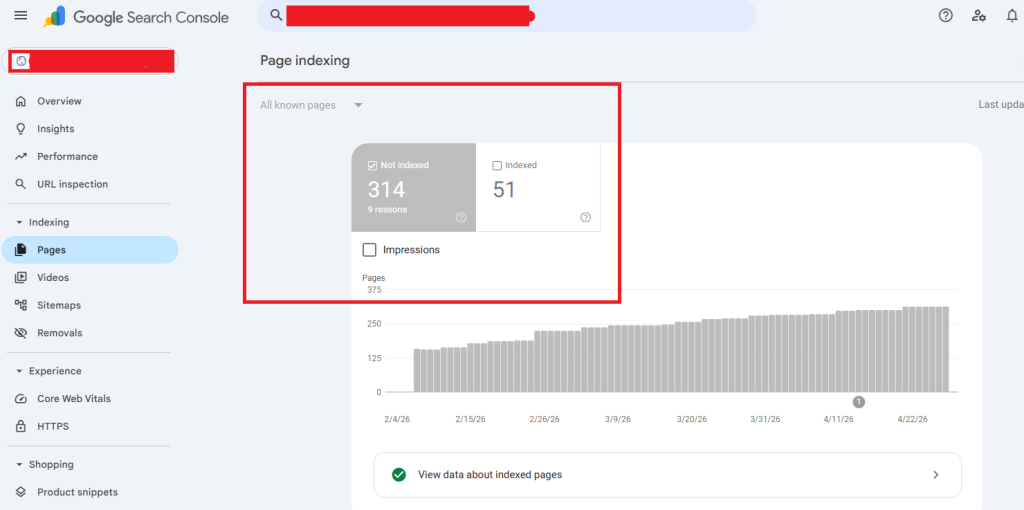
What’s Actually Happening Behind the Scenes?
This is where many new website owners get confused. Publishing content does not mean Google will instantly start showing your pages in search results.
Before Google increases visibility, it usually:
- crawls your pages
- understands your content
- checks technical quality
- evaluates relevance
- tests whether users engage with it
In most cases, the process looks something like this:
| Stage | What Happens |
| 0 impressions | Page not indexed or weak keyword targeting |
| Low impressions | Google is testing visibility |
| Gradual growth | Trust and relevance slowly improve |
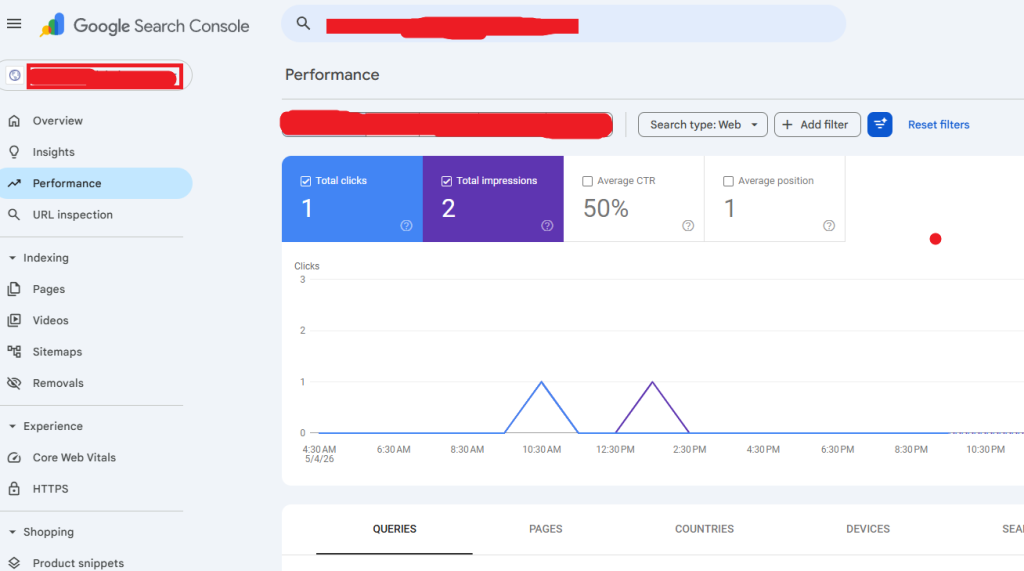
Could Google Search Console Itself Be Showing Incorrect Data?
Honestly, yes — sometimes the issue isn’t entirely with your website.
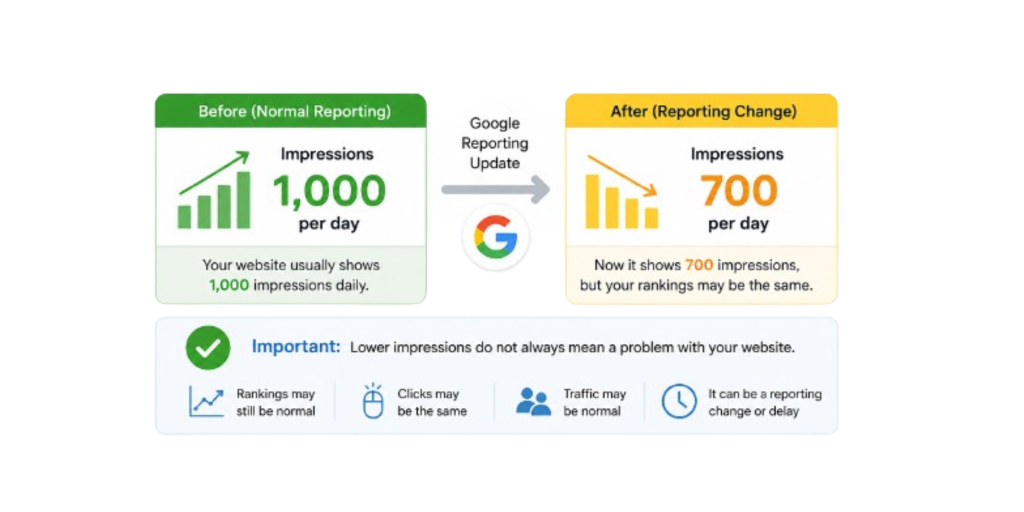
Changes to Google Search Console reporting occasionally affect how impressions appear in reports. Some website owners recently noticed lower or delayed impression counts because of reporting adjustments, not ranking drops.
Sometimes Google changes the way it counts and shows impressions in Search Console. Because of this, impression numbers may go down or update slowly.
It does not always mean your website lost rankings.
Example:
Yesterday your website showed 1,000 impressions.
Today it shows 700 impressions.
This can happen because Google changed reporting, not because your SEO became bad.
At the same time, many people accidentally
- Check the wrong date range.
- Apply incorrect filters
- Use the wrong property version.
This creates confusion very quickly.
Before assuming your SEO is failing, confirm the data itself is accurate.
First: Verify Your Google Search Console Setup
Before rectifying content or SEO, make sure Search Console is tracking the correct website version.
This is a surprisingly common mistake.
For example:
- HTTP instead of HTTPS
- www separated from non-www
- URL-prefix property instead of Domain property
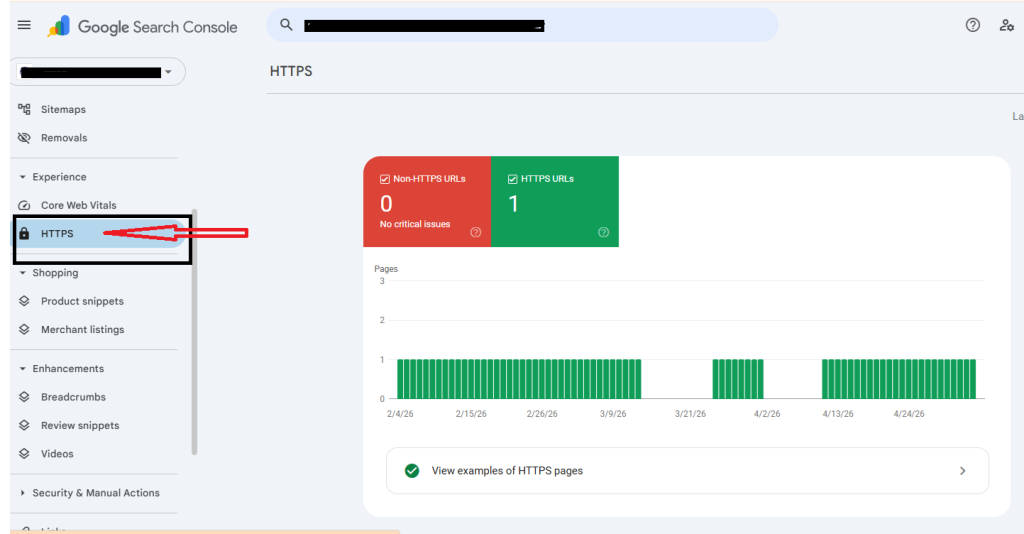
I’ve personally seen websites where impressions looked completely “dead” simply because data was split across multiple properties.
Quick Things To Check
| Common Setup Issue | What Happens |
| Wrong property type | Impressions appear to be missing |
| HTTP/HTTPS mismatch | Data gets split |
| Unverified property | No reporting data |
| Wrong filters applied | Impressions look lower |
Recommended Fixes
- Use a domain property whenever possible.
- Verify both the www and non-www versions.
- Keep HTTPS properly redirected.
- Double-check filters inside the performance report.
Honestly, many websites discovered their impressions were never actually “missing.”
The reporting setup was simply incorrect.
Why Is My Website Not Getting Impressions?
1. Your Page Is Not Indexed
If your page is not indexed, it simply will not appear in Google search results.
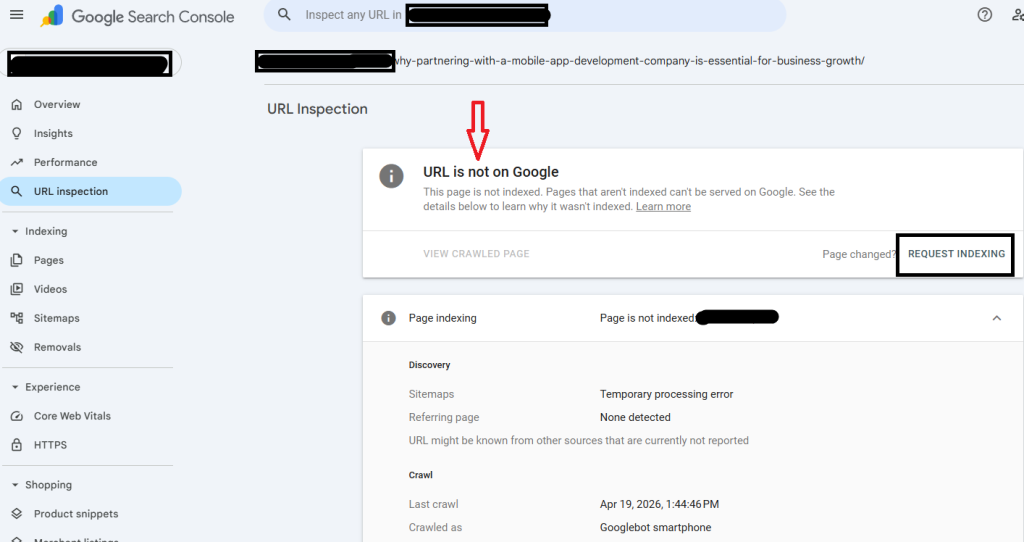
Check This Inside Search Console
URL Inspection → Enter URL
If Google says:
- “Discovered: currently not indexed”
- “Crawled: currently not indexed”
Then Google knows the page exists, but it hasn’t fully indexed it in search results yet.
This is where many website owners get confused. Google finding a page does not always mean Google trusts or ranks it immediately.
Fix This First
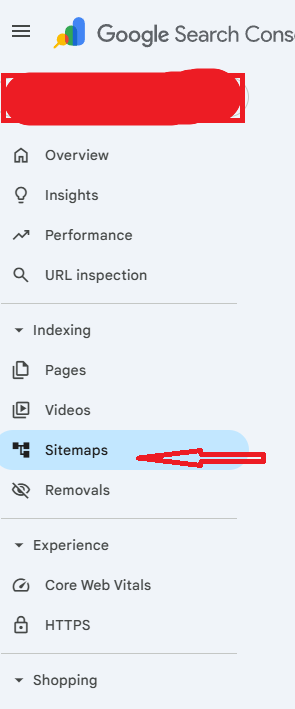
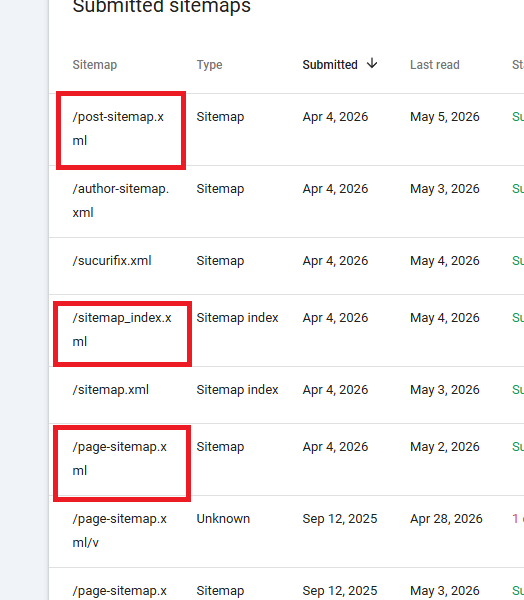
- Submit your sitemap
- Request indexing manually
- Remove accidental noindex tags.
- Check robots.txt blocks
Sometimes, pages are accidentally told not to be indexed during development. This small mistake quietly blocks impressions for many new websites.
2. You Are Targeting the Wrong Keywords
This is one of the biggest reasons websites stay invisible.
Many people publish content around broad topics like the following:
- SEO tips
- website traffic
- digital marketing
But these keywords are extremely competitive.
One common mistake I see very often is targeting keywords nobody actually searches for or targeting keywords that are too difficult for a new website to rank for.
My personal advice is to start with low-competitive keywords like
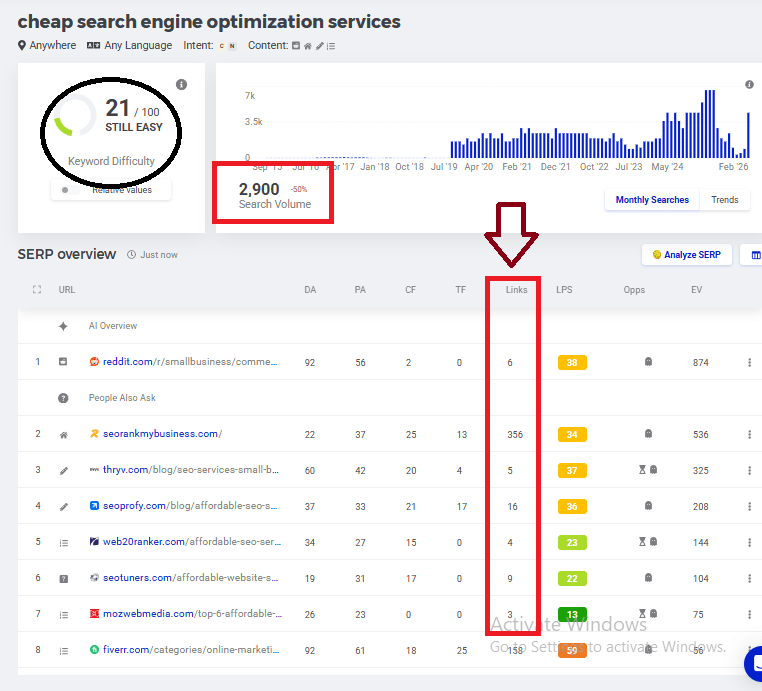
As shown above, these are low-competition keywords with fewer or zero backlinks, which can be very easy to rank for compared with high-competition keywords. Give it a try on my words.
Better Keyword Examples
| Weak Keyword | Better Keyword |
| Cheap search engine optimization services | How to get impressions on Google |
| Website traffic | Why is the website not getting impressions |
| Google ranking | How to fix zero impressions in GSC |
Honestly, this is why many good articles still receive zero visibility. The content may be useful, but the keyword targeting is too broad or unclear.
Better Approach
Focus on:
- real user questions
- frustration-based searches
- long-tail keywords
- “How,” “why,” and “when” queries
These are the types of searches real people actually use.
3. No Real Search Demand
Sometimes the content itself is fine… but nobody is actively searching for that topic.
This happens more often than people realise.
Before writing content, always validate whether users are actually searching for the topic.
You can check this using:
- Google autocomplete
- People Also Ask
- Google Keyword Planner
- Ahrefs Webmaster Tools
Even small keyword validation can completely change visibility results.
4. Your Website Has Low Trust
New websites do not get instant visibility.
Google takes time to evaluate:
- consistency
- content quality
- topical relevance
- website trust
This is completely normal, even if your content is genuinely good.
Many new websites expect to see impressions within a few days, but Google usually moves much more slowly at first.
Things That Help Build Trust Faster
- clear author bio
- About page
- Contact page
- internal linking
- consistent publishing
- backlinks from relevant sites
Real Example
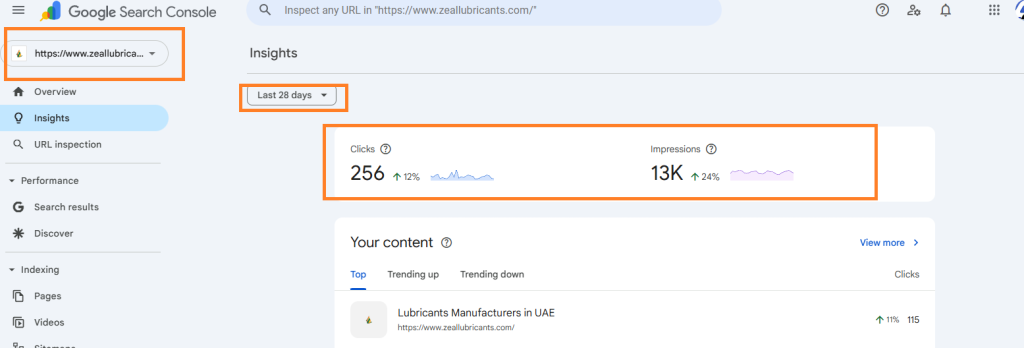
I recently saw a new website stay at almost zero impressions for weeks. The main issue was not content quality; the site simply lacked internal links and a sitemap setup.
After fixing those basics, impressions slowly started increasing within days.
5. Technical Issues Blocking Visibility
Technical SEO problems often stay hidden in the background, which is why many website owners completely overlook them.
Even small technical issues can quietly reduce impressions.
Common Technical Problems
- missing sitemap
- noindex tags
- slow loading speed
- mobile usability issues
- server errors
- broken canonical tags
Important Technical Checks
Inside Search Console, review:
- Page Experience
- Core Web Vitals
- Crawl Stats
- Mobile Usability
Small technical improvements can sometimes yield surprisingly large visibility gains.
For example, websites that improve page speed and mobile usability often see gradual growth in impressions over a few weeks.
6. Could Manual Actions or Security Problems Affect Impressions?
In some cases, yes.
If Google detects:
- spammy behavior
- hacked pages
- malware
- policy violations
Visibility can drop very quickly.
This does not happen to most websites, but it is still important to check.
Inside Search Console:
Security Issues
Manual Actions
If Google flags something there, impressions may stay limited until the issue is fixed.
The good news? Most websites struggling with zero impressions are usually dealing with simpler issues like indexing, keywords, or content clarity, not penalties.
How to Get Impressions on Google?
Keep the process simple.
Focus on basics first:
- Make sure pages are indexed.
- Use real search queries.
- Answer questions clearly
- improve internal links
- Share content consistently
- Update weak pages gradually.
Many people overcomplicate SEO early. In reality, fixing fundamentals usually creates the biggest improvements.
When Will My Website Start Getting Impressions?
Here’s the realistic expectation for most new websites:
| Website Age | Typical Impressions |
| Week 1 | 0–50 |
| Month 1 | 50–500 |
| Month 3 | Gradual consistent growth |
These numbers are not fixed, but they give a realistic picture of how slow early SEO growth usually feels.
If indexing, keyword targeting, and technical setup are properly optimised, impressions can increase much faster.
Where Should You Focus First?
Don’t try fixing everything at once.
Start here:
- Indexing
- Correct Search Console setup
- Keyword relevance
- Content clarity
- Internal linking
That’s where most visibility problems usually begin.
Quick Diagnostic Checklist
✔ Search Console verified properly
✔ Correct property selected
✔ Sitemap submitted
✔ Pages indexed
✔ Targeting real keywords
✔ No noindex tags
✔ Internal links added
✔ Mobile-friendly pages
✔ HTTPS enabled
If these basics are already in place, the next step is usually to improve keyword targeting, topical authority, and content depth.
Final Thought
If your website has zero impressions, it usually does not mean your website is failing.
In many cases, Google simply needs the following:
- stronger signals
- better clarity
- more trust
- better keyword alignment
Honestly, most websites facing this issue are dealing with small gaps,not massive SEO failures.
The key is consistency, not panic.
Once indexing, content clarity, keyword targeting, and technical setup improve together, impressions usually start appearing gradually.
FAQ:
Why is my website getting zero impressions in Google Search Console?
Zero impressions usually mean Google is either
- not indexing your pages properly
- not understanding your content yet
- or not finding enough relevance for the keywords you are targeting
In many cases, this happens with:
- new websites
- weak keyword targeting
- technical SEO issues
- Incorrect Search Console setup
The good news is that most of these problems are fixable once identified properly.
What does it mean if my page is indexed but still has no impressions?
If your page is indexed but impressions are still zero, Google has stored the page, but it is not confident enough to show it in search results yet.
This usually happens because:
- The keyword has very low search demand.
- The topic is too competitive.
- The content lacks topical relevance.
- Google is still testing visibility.
Honestly, this stage is very common for newer websites.
How long does it take for a new website to start getting impressions?
For most new websites, impressions can take anywhere between the following:
- 2 to 6 weeks normally
- faster if indexing and keyword targeting are strong
Google usually takes time to do the following:
- crawl pages
- understand content quality
- Evaluate trust signals
That’s why early SEO growth often feels slow at first.
How do I check whether my page is indexed properly?
Inside Google Search Console:
URL Inspection → Enter your page URL
If Google says:
- “URL is on Google” → indexed properly.
- “Discovered – currently not indexed” → found but not indexed yet.
- “Crawled – currently not indexed” → Google visited the page but did not fully index it yet.
You can also request indexing manually from the same section.
Can the wrong Search Console property cause missing impressions?
Yes, this is actually more common than many people realize.
For example:
- HTTP vs HTTPS mismatch
- www vs non-www split
- wrong URL-prefix property
can make impressions appear incomplete or missing.
Sometimes the impressions are there, but the data is being tracked inside another property version.
Does low search volume cause zero impressions?
Absolutely.
Even good content may receive zero impressions if nobody is actively searching for the topic.
That’s why keyword validation is very important before writing content.
Focus more on:
- real user questions
- long-tail searches
- “How,” “why,” and “when” queries
These usually perform much better for newer websites.
How do I know if the problem is with keywords or indexing?
A simple way to identify this:
If the page is NOT indexed:
It’s an indexing problem.
If the page IS indexed but impressions remain zero:
It’s usually a keyword, competition, or relevance issue.
You can confirm this inside:
Search Console → URL Inspection + Performance Report
Can technical SEO issues completely stop impressions?
Yes.
Technical issues can quietly block visibility without showing obvious errors.
Common examples include:
- noindex tags
- blocked robots.txt
- missing sitemap
- slow mobile performance
- server errors
- broken canonical tags
Even small technical issues can reduce visibility significantly over time.
Why is my content not showing in Google even after publishing?
Publishing content does not mean Google will instantly rank it.
Google still needs to:
- crawl the page
- understand the topic
- evaluate quality
- test visibility signals
Sometimes the issue is simply:
- low trust
- weak keyword targeting
- thin content
- lack of internal links
This is especially common for new websites.
What is the fastest way to start getting impressions on Google?
The fastest way is usually to fix the fundamentals first:
- submit sitemap
- request indexing
- target low-competition keywords
- answer real user questions
- improve internal linking
- publish consistently
Many websites focus too much on advanced SEO while ignoring these basics.
Honestly, strong fundamentals usually create the biggest early growth.
Author Bio
Shashi Heerekar is the director of Oxygen and a digital marketing strategist with 18+ years of experience in SEO, search visibility, organic growth, and performance-driven content strategy. Over the years, he has worked with businesses across multiple industries, helping websites improve Google rankings, increase organic impressions, and build long-term search visibility through practical SEO strategies.