
About the Author
Shashi, director at Oxygen, has several years of experience helping businesses improve their Google rankings, indexing, and overall SEO performance. He has worked on multiple SEO recovery and technical optimization projects, focusing on practical strategies to improve website visibility and long-term organic growth.
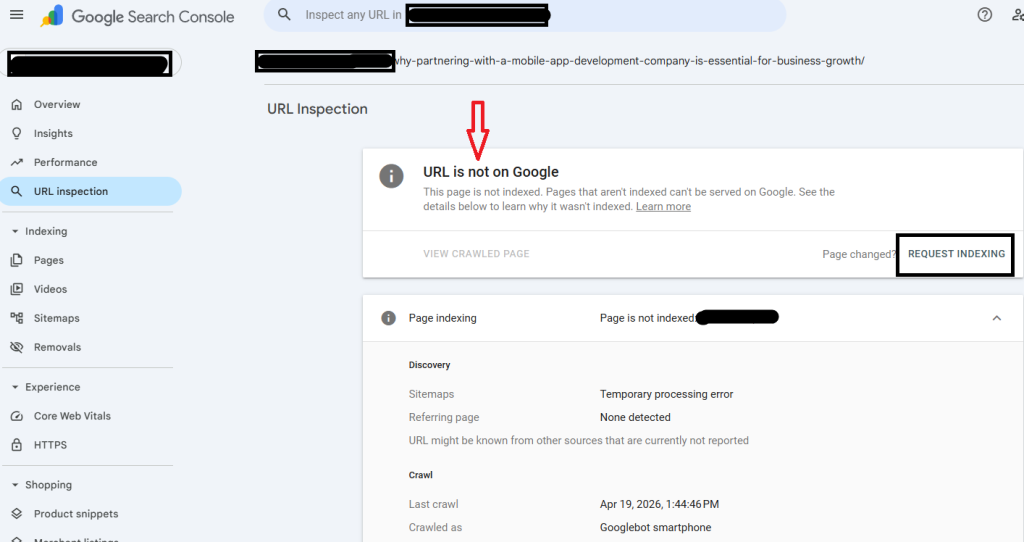
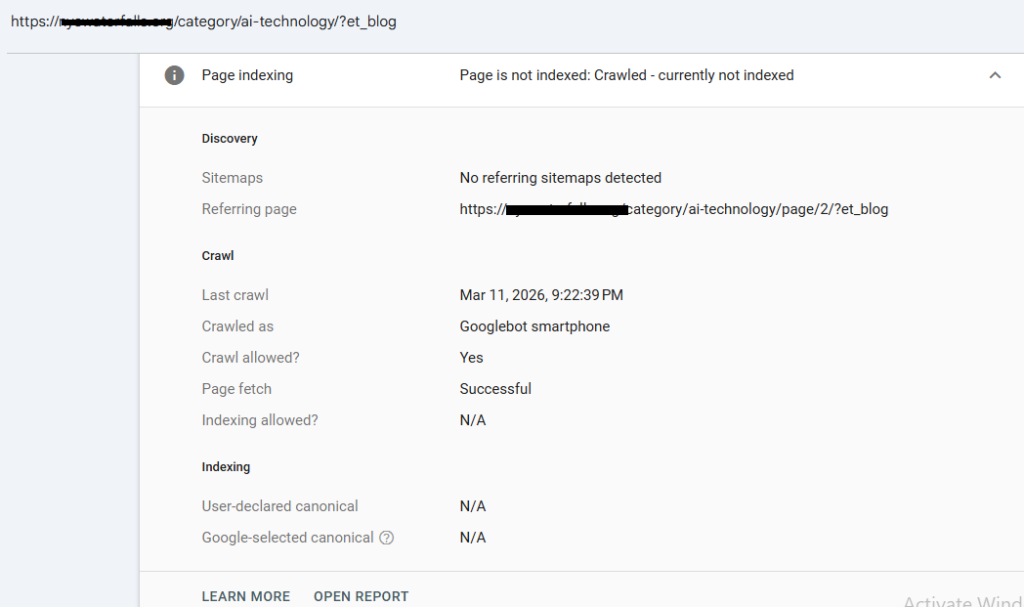
If your page shows “Crawled – currently not indexed” in Google Search Console, it means Google has visited your page but hasn’t added it to search results yet. Usually, this happens because Google feels the page is not useful, unique, or strong enough compared to other pages already indexed.
This challenge is becoming increasingly prominent as we move into 2026, making it vital to understand its contributing factors.
Google’s indexing systems are now far stricter because of the explosion of AI-generated content across the internet. Pages that look repetitive, thin, or mass-produced are often crawled but quietly ignored. I’ve seen even decent-looking articles fail to index simply because they lacked originality or real experience signals.
So if you’re wondering:
- Why Google is not indexing my page,
- What causes a page to be crawled but not indexed?
- or how to solve the crawled, currently not indexed issue,
To help you address these changes, this guide explains the real reasons behind the issue and provides practical solutions effective in today’s environment.
Quick Overview Table: Why Google Crawls But Does Not Index Pages
| Problem | What It Means | Common Fix |
| Thin or short Content | Content lacks depth or originality | Add examples, expertise, FAQs and stats too if required |
| Duplicate Content | Similar pages already exist | Rewrite or merge content |
| Weak Authority | The site lacks trust signals | Build backlinks & topical authority |
| Poor Internal Linking | Google sees the page as low priority | Add contextual internal links |
| Technical Problems | Rendering or indexing issues exist | Fix robots.txt, canonicals, and speed |
| Outdated Information | Content feels stale | Update with current 2026 information |
| AI-Heavy Generic Writing | The content sounds repetitive | Add human experience and insights |
What Does “Crawled – Currently Not Indexed” Mean?
This status means:
- Googlebot successfully visited your page.
- Google analyzed the content.
- But Google decided not to include it in the search index yet.
This is actually different from the following:
- Discovered – currently not indexed → Google found the URL but hasn’t crawled it yet.
- Blocked by robots.txt → Google cannot access the page.
- Noindex tag → You told Google not to index it.
When a page is crawled but not indexed, the issue is usually related to content quality, trust, duplication, or usefulness.
Why Google Is Not Indexing My Page
There are usually multiple reasons behind this issue. Let’s go through the ones I personally see most often while auditing websites.
1. Your Content Feels Too Generic
This is the biggest reason for crawled pages not currently being indexed.
Google already has millions of pages for almost every topic. If your content says the same thing as everyone else, Google may decide the following:
“We already have enough pages like this.”
Many AI-generated blogs struggle because they sound technically correct but emotionally empty.
For example:
- generic explanations,
- no real examples,
- no screenshots,
- no personal experience,
- no updated insights,
- repetitive phrasing.
I recently reviewed a website where 40+ articles stayed unindexed for weeks. The moment we added:
- real client examples,
- updated statistics,
- practical fixes,
- conversational tone,
- FAQ sections,
Google started indexing pages much faster.
That pattern is becoming extremely common now.
2. Weak E-E-A-T Signals
Google now heavily evaluates the following:
- Experience
- Expertise
- Authoritativeness
- Trustworthiness
If the content feels anonymous or “mass-produced,” indexing slows down.
Pages perform better when they include:
- real author information,
- business credibility,
- expert opinions,
- real-world observations,
- recent examples,
- trustworthy references.
Honestly, Google seems much better at detecting whether someone actually understands the topic or is just rewriting what others have already written.
3. Duplicate or Similar Pages
This happens a lot on SEO and service websites.
Example:
- /seo-company-hyderabad/
- /best-seo-company-hyderabad/
- /affordable-seo-company-hyderabad/
If all pages contain similar content, Google may crawl them all but index only one.
This issue is especially common on the following:
- programmatic SEO websites,
- e-commerce filter pages,
- AI-generated blogs,
- city landing pages.
Sometimes, combining weaker pages into one powerful page works much better.
4. Your Website Still Lacks Authority
New websites often face indexing delays.
Even if the content is decent, Google may wait because
- The domain is new.
- Backlinks are weak.
- Brand signals are low.
- and engagement is limited.
I’ve seen websites publish 20 articles, and only 5 are initially indexed. That’s actually normal.
As site trust increases, indexing speed usually improves as well.
5. Poor Internal Linking
Internal links help Google understands:
- which pages matter,
- how topics connect,
- which URLs deserve attention.
If no pages link to your article, Google may treat it as low priority.
A simple internal linking strategy can genuinely improve indexing.
Recent Indexing Trends in 2026
Google’s indexing behavior changed noticeably after the rapid growth of AI-generated content.
According to multiple SEO industry studies and Search Console observations:
- Many websites now see slower indexing rates.
- Thin AI pages often remain unindexed.
- Topical authority matters more than publishing frequency.
- Helpful content signals heavily affect indexing decisions.
Some SEO communities have recently reported that even technically optimized pages remain unindexed unless they offer genuinely original content.
Publishing more content alone isn’t enough anymore.
Quality now matters more than quantity.
Real Example: How We Fixed Crawled But Not Indexed Pages
One business website currently has around 60 pages stuck in a ‘crawled, not indexed’ status.
The content wasn’t terrible. But it felt generic.
We improved:
- article depth,
- user-focused explanations,
- internal linking,
- content freshness,
- author trust signals,
- visual elements,
- FAQ sections.
Within a month:
- indexing improved significantly,
- crawl frequency increased,
- Impressions started appearing again.
The interesting part?
We didn’t build massive backlinks initially.
Most improvement came from making the content genuinely more useful.
How to Fix “Page Crawled But Not Indexed”
Improve Content Quality First
Before requesting indexing again:
- Expand the article,
- Add practical examples,
- include screenshots,
- Add FAQs,
- improve readability,
- include unique insights.
Ask yourself:
“Would someone genuinely learn something new from this page?”
If not, Google may feel the same way.
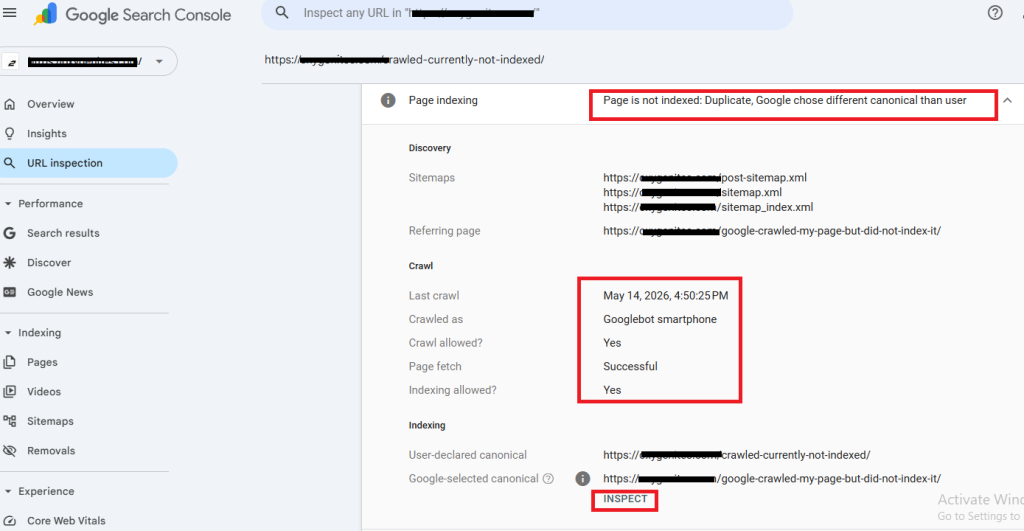
In the above image, you can see Google has crawled my page but didn’t index it due to some confusion or finding a duplicate slug; this can also be one reason. Please do check on that too.
Strengthen Internal Linking
Link to the page from:
- related blogs,
- homepage,
- category pages,
- service pages.
Use natural anchor text instead of forced keyword stuffing.
Check Technical SEO Issues
Look for:
- accidental noindex tags,
- broken canonical tags,
- robots.txt blocks,
- server downtime,
- slow speed,
- JavaScript rendering issues.
Technical mistakes still cause many indexing problems.
Build Authority Slowly
Google indexes trusted websites faster.
Focus on:
- quality backlinks,
- topical authority,
- branded traffic,
- consistent publishing,
- helpful content.
Trust takes time.
Frequently Asked Questions
What does “Crawled – currently not indexed” mean in Google Search Console for my page?
It means Google successfully visited your page but has not yet added it to the search results. Usually, this happens because Google deems the content lacks sufficient quality, uniqueness, trustworthiness, or importance relative to other indexed pages.
If Google has already crawled my page, why isn’t it showing up in search results yet?
Crawling and indexing are different processes. Google may crawl a page first and later decide whether it deserves inclusion in search results. Thin content, duplicate information, low authority, or weak user value are common reasons pages remain unindexed.
How long does Google usually take to index a page after it has been crawled?
Sometimes indexing happens within hours, while other times it can take several weeks. New websites or low-authority domains often experience slower indexing. If a page remains unindexed for more than 2–4 weeks, there may be content quality or technical issues that need to be addressed.
Can low-quality or duplicate content cause Google to crawl my page but not index it?
Yes. Low-value, repetitive, or duplicate content is one of the biggest reasons content isn’t being indexed. Google prefers pages that offer original insights, useful information, and real experience-based value.
Do technical issues, such as noindex tags, robots.txt, or server errors, lead to pages that are crawled but not indexed?
Yes, technical problems can absolutely affect indexing. Incorrect noindex tags, blocked resources, slow servers, broken canonicals, or rendering problems may prevent Google from properly indexing a page, even after it has been crawled.
What steps can I take to fix a page that is “crawled but not indexed” and get it into Google’s index?
You should:
- improve content quality,
- add internal links,
- remove duplication,
- fix technical SEO issues,
- update outdated information,
- strengthen authority signals,
- and request reindexing through Google Search Console.
Usually, improving usefulness and originality gives the best results.
How can internal links, backlinks, and website authority affect whether a crawled page gets indexed?
Internal links help Google understand which pages are important on your website. Backlinks and authority signals increase Google’s trust in your domain. Websites with stronger authority and better site structure usually experience faster and more consistent indexing.
Final Thoughts
If your page shows as crawled but currently not indexed, don’t immediately assume your website is penalised. In most situations, Google is simply being selective.
The web is now flooded with repetitive content, especially after the rise of AI-generated publishing. Google’s systems are trying much harder to prioritise pages that feel genuinely useful, experience-driven, and trustworthy.
So instead of publishing dozens of average articles, focus on creating pages that:
- solve real problems,
- provide original insights,
- include practical experience,
- and genuinely help users.
That’s what Google increasingly rewards in 2026.