The successful ban on TikTok in the Indian Market has given the opportunity to many apps. One of the latest technology-based application platforms to share and create the videos is Josh App. Appreciating the marketing campaign ‘Vocal for Local’, it falls under ‘Made In India’ application section. It provides many languages support to film the videos in their original language in the different states of India. You can promote yourself by featuring in different creatives by gaining followers. After a certain amount of followers, the profile is verified by Josh Verification Service.
In the virtual platform of video sharing and creation, the competition is at its best. With the latest new release of an application a few months back, Josh App is among one of the hordes. As for the TikTok alternative, it supports more language for video making where you can share more and more information.
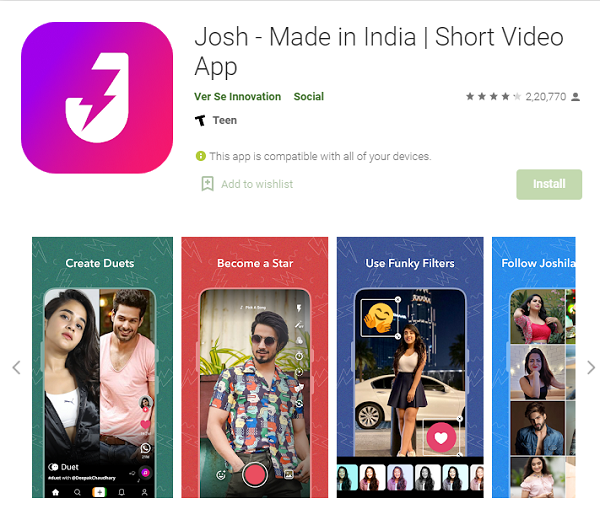
Josh Verification Service – Download from Google Play Store.
The various languages it supports like Hindi, Tamil, English, Kannada, and Malayalam. You can create and find topics or the stuff of different genres like Bollywood, Dance, books, Journalism, and more. For this much service, you need to just download a single app and go with the assessment.
Josh Statistics 2020:
At present, there are 50 Million plus daily Android phone users. They have registered with their details or email id on Josh from different IP Addresses or countries. The application has grabbed the Indian market with its best service which includes sharing links, making videos, and Josh Verification Service.
The application-based online sharing and making videos firm trying to hit the market with their Apple Mobile support. It’s is available on the Play Store with the latest version of 1.0.10. The latest file is available with a smoother user interface and many bugs issues have been fixed. It competes with many applications like Roposo, Moj, Mitron, Chingari, etc.
How To List Josh App In Your Mobile Phone App Menu?
Currently, it is present on the Play Store only which can be accessed by Android Smartphone users. And, the entertainment section of Google Play Store contains this project or the Josh app. The online firm is trying its best to initiate this service to provide the API in the Apple i-Store. So that, you can also enjoy its outstanding and quality service on either phone from any IP address, location, country, or network.
You can also get the APK files from the third-party website and after downloading the installation will begin automatically. After getting the software, you can begin the utilization of features including the Josh Verification Service.
If You Don’t Know How To Use, Follow The Instructions
On a successful attempt of installation, the system will ask you language preference to use it. Select the only language listed in the language segment of the app. Upon selection, it will take you to Home Page and from there, you can watch the videos.
It provides a very smooth and user-friendly interface which is very similar to the banned application i.e. Tik-Tok. You can enjoy both international but, mostly regional videos based on preferences. You can get more and more entertaining stuff related to school days, affiliates, entertainment, and all. To watch such videos on Josh, you need to simply scroll either up or down.
If You Are Creative Then, Start Sharing Videos To Become Famous
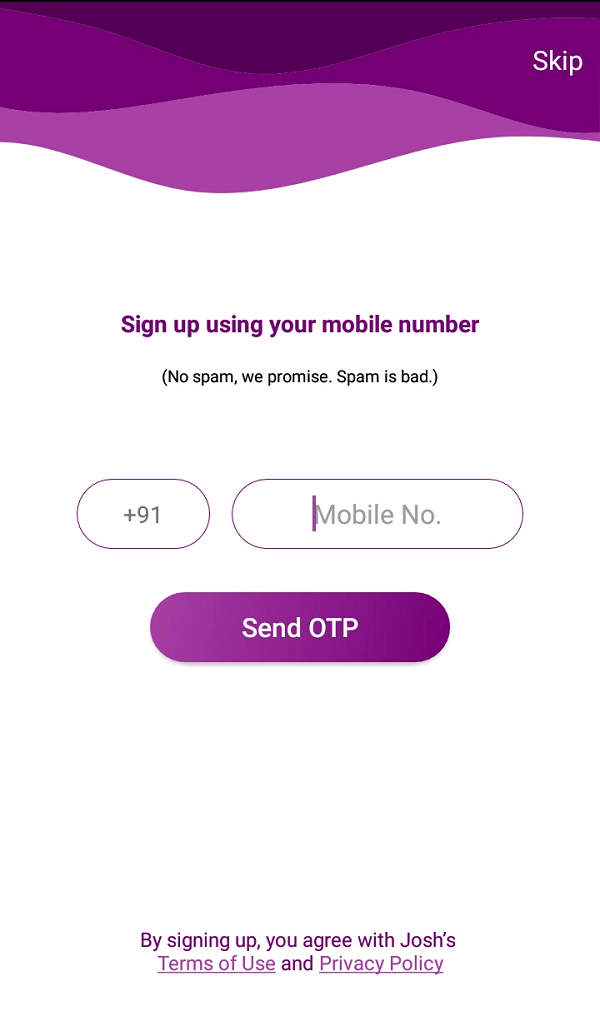
To use this feature, you need to give some permission to the Josh App. Video making plays a very important role in your profile verification. Upon fulfilling the requirements shown on display, you need to Sign Up for the personal account or Log-In simply if you’re an existing member. After account creation, start creating the videos of your interest for few minutes. While making, keep in mind the influence will have on watchers.
After successfully making the video, you need to share the short recordings on the platform. Promotion plays important role in Josh Verification Service. You can share your content on the software-based Josh App to promote. For the promotion, go for sharing in different social media like Facebook, WhatsApp, Instagram, and many others. In case you want to promote somebody else’s creativity. Then, look for a three-dot option to share a video on your profile.
How To Get Josh Verification Service For Your Profile?
How To Get Josh Verification Service For Your Profile
The Sooner you get verification, you will receive a Blue Badge in the Josh Application profile. The user will have to follow the instructed guidelines of the application-based sharing platform. The popularity of the user can increase the maximum number of followers. To increase followers you need to follow the below-mentioned things.
1] By Increasing Traffic On Your Profile
It is done in various ways which include making more entertaining short videos. The interesting stuff captivates watchers more to your profile. To make videos more glamorous entertaining, you need to do out-of-context creativity. Sometimes simple 5-minutes videos can work for you but, being creative is the best way. Creativity includes the application of the best editing techniques by various editing applications available in the market. The role of filters, music, etc. is to make the videos more interesting.
To lure more viewers the quality and quantity of videos play a vital role. The release of videos on fixed timing is essential as it maintains the eagerness and interest of viewers. Once the video is created review it and, if any discretion is found, fix it. After a successful attempt of reviewing, you need to release the video on the app wait for popularity gain. You can also add those videos in which you find someone has not performed better. Just use the feature to work on the specific video. It is the best way for up-gradation it helps in Josh Verification Service.
2] By Following The Set Of Steps Instructed By Company Guidelines
The set of instructed steps is found in Josh Application guidelines. Once you have reached a certain follower as mentioned in the guidelines. Your profile will be automatically ticked with the Blue Badge. If it doesn’t get verified then, you will have to follow certain steps:
You need to look for About section in the setting of your App.
After digging into About section, look for the help support option.
On reaching help support page, email the digital platform telling your issue about Blue badge Gain.
The verification of your profile will complete once it is reviewed by support assistance.
Once you set your foot in sharing the short video sector, every time you need to look for creative videos. After sharing edited videos, the video automatically reaches the person who has followed you. Now, maximum people follow you meaning your videos are top-class. Here comes the role of verified accounts.
Unverified accounts may have issues and consequences for follower gain or popularity achievement. The verified account comes with the inbuilt feature. In which your recorded videos will be recommended more to those who have not followed you.
How to Increase Followers on Josh App:
Many people are asking this question How to increase followers on Josh App. So, In this section of the article, we will discuss how to increase followers in various ways.
We will divide the discussion into two parts. One is Genuine ways and Fake Ways.
Genuine Ways:
Make Video on Josh and Share with your friends and Family. Request them to follow your profile on Josh. If you are a starter on the app then only do this.
Josh is relatively a new platform for mobile users. You can share your Josh videos on your socials like : Facebook, Twitter, Instagram, Pinterest and many more. It will increase your followers on Josh as they will come to know that you are sharing some interesting content on the platform.
Josh algorithm will work for those people who are active and keep updating their profile with new videos on the platform. This will give you a certain leverage over other users if you keep posting new content on the platform.
On Josh App if you post content that is regular (That is posted by other users as well) will not work. Make sure your content is unique and outstanding. Try to study the content which is working and which is not on the platform with your regular results. And make video according to it.
You can reply to your audience in the comment section, that will make your followers comfortable while interacting with you.
You can Connect with your audience on Social Media by making your fan pages on Facebook, Instagram and Twitter Profiles. You can go live on those platforms and running sections like QnA, Running contest.
You can also share your regular day activity with you followers on Social Media that will encourage your audience to understand you more.
Fake Ways:
Purchasing Followers that can cost around $9 to $10 for 1000 Followers can lead to termination of your Josh account.
Followers exchange group where you can get reported for your profile and getting Ban on Josh.
There are huge advantages of getting the Google Knowledge Panel Verification Service, getting verified on Twitter, Facebook, Instagram, and other social media platforms. You might have experienced that how a verified brand profile added value to your business revenue. And as an individual who is a public figure, might have experienced increasing followers on your official page. And later they join you in real life.
But did you know, Google Knowledge Panel is one of such important panels that must not be ignored?
Well! Don’t worry if you don’t have any ideas! We have discussed all the important things related to Google Knowledge Panel Verification Service in detail. It will help you to feature your brand on google SERP. Before going in-depth, let’s first understand the role of the Google Knowledge Panel.
What Is Google Knowledge Panel and How It Works?
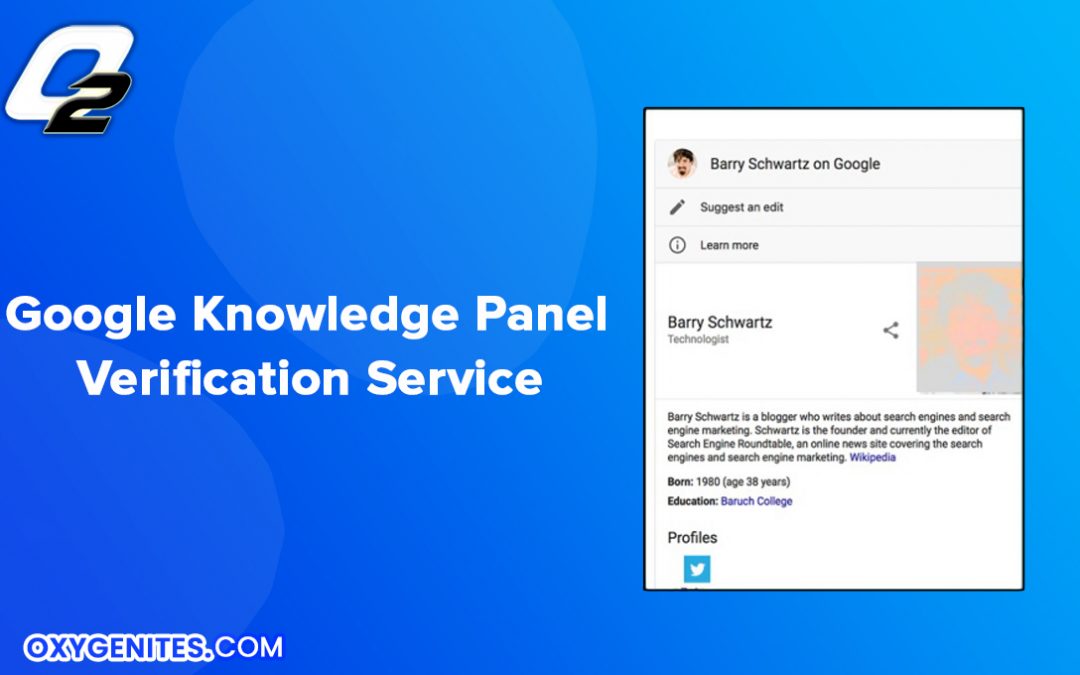
Google Knowledge Panel is the reach web search result which shows at the right sidebar in the Google search result page. It will show you the knowledge panel based on your query related to entities like organizations, public figures, brands, places, history, animals, things, etc.
Establishments and Statistics of Google Knowledge Panel
The knowledge panel, also known as infoboxes were added by Google on the search engine result page recently in May 2012.
Within half a year after rolling out the feature, Google indexed around 18 billion facts and more than 500 million entities.
In the middle of 2016, it received 70 billion facts.
Till now, it has received around 500 billion facts which covered around 5 billion entities.
What are the details Google Knowledge Panel shows?
Google bots work to collect the most possible information on a searched query done by a user. It fetches the information from Google My Business profile, Wikipedia, CIA World Factbook, Wikidata, and other various authentic resources. The details of the information vary based on the industry which meets your searched keywords.
For instance, if you are searching for any brand information, it will show you the dedicated website URL along with brief information. It will also show you the name of the CEO, Founder, Headquarters, establishment year, revenue, and more.
Similarly, if you are searching for a celebrity or an actor, it will show you their quick details. It might include the biography, movies released, upcoming movies or album, social media profiles, family background, siblings, and more.
How can you get your custom and verified Google Knowledge Panel?
If you are an individual or a business brand, then following the below steps, you can also come on the Google search knowledge panel.
Navigate to the right-side panel featured with the Google knowledge panel. Scroll down till the end and you will see the option namely “Claim this knowledge panel”.
Click on that and you will be landed on a login page.
Now provide the required credentials and go forward.
Further, you will have to complete all the asked details along with the essential proof of your claim.
Finally, submit the form by providing the true reason that “why this account should be verified?”.
Why should you go for Google Knowledge Panel Verification Service Professional rather than doing it by yourself?
In this internet-based era, people believe in Google anything for gathering information or buying products. It is the golden opportunity for the businesses to convert the potential customer into the client.
If you are a public icon like a celebrity or a leader and willing to showcase your portfolio online. Else, if you are a business owner and want to make a nice brand presence on the internet world. In either case, definitely you will never want to misguide the users knowingly or unknowingly.
Bringing your business online means, brand reputation is the only key to get success. So, from the beginning, you must consult the experts who provide Google Knowledge Panel Verification Service. You should contact the giants who can help you to synchronize your business information throughout the digital profile including social media and Google search.
There are two types of SEO: on-page and off-page SEO. On-page SEO deals with content and page optimization, and off-page SEO concerns establishing relations between websites. Technical SEO is a different thing from both of these categories.
Technical SEO relates to all SEO activities excluding content optimization and link building. Simply put, it covers the following search engine requirements in order to improve crawling. Such requirements are constantly in flux and becoming more complex in order to keep up with the search engines. Technical SEO is in a state of constant refinement. It needs to be optimized to make the necessary foundation that provides your content and links with the best possible marketing environment.
Technical SEO elements
1. Website speed
Even tech giants like Amazon discovered that every 100 ms of page load time led to a one percent decrease in sales. It is stated that page load speed is included in the top ten SEO ranking factors. He described it in his case study of analyzing over one million Google search results.
Ways to improve website load speed and make user experience smooth?
Use simple templates
Limit the components of your website and make your templates minimalist. In the case of templates and designs, there is one necessary rule of thumb to remember: “less is more.”
Any additional elements of your layouts—plugins, widgets, tracking codes—need the extra time to load. This also refers to the code, which needs to be optimized as well.
The more elements on a page that need to load, the longer your users must wait. And you better not make them wait longer than 3 seconds.
Achieve a healthy balance between a minimum amount of necessary elements and a complete page design. And don’t forget to make these adjustments as well; they’ll be sure to cut down the load time:
Optimize the visuals
Make your images sharp by adjusting their sizes correctly. However, limit the size to the necessary minimum because large pictures are very heavy and can strongly disturb your loading time. Using the JPG format for photographs (as they have more tones at their disposal) and PNG for graphics.
Limit the redirects
Multiple redirects influence your page load speed negatively, too. The more redirects installed on one page, the longer a user must wait. You should always try to reduce the number of redirects and make sure you only have a single redirect on a page.
In the case of 404 error pages, when there is a “page not found,” make sure that you come up with a custom one. Design should be user-friendly and be able to guide back to your home page. Never let a user be directed onto the standard 404 error page. It will immediately make him bounce off your website and end the session.
Error pages can be found in Google Search Console. Go to “crawl,” then “crawl errors” to locate the “URL error” report, which is divided into the desktop, smartphone, and feature phone categories. You will be able to check your website’s 404 errors and decide what to do with them.
Browsers cache
The browser cache starts to store website resources automatically (on a local computer) the first time you visit a web page. This is because your browser “remembers” the first website version cached. It is then able to load it much more quickly when you leave a particular page and return to it again. This significantly improves the page load speed for returning visitors.
2. Mobile friendliness
Mobile-friendliness is the second element of technical SEO, and it’s as important as website speed. If you don’t know yet whether your site is mobile-friendly or not, you may test it by using Google’s mobile-friendly test tool. This will give you an idea of its mobile-friendliness and how to optimize it for better.
3. Site architecture
The following elements are an important part of a good site architecture:
HTTPS
A good site architecture begins with choosing an appropriate hypertext transfer protocol. In this case, there is only one SEO-friendly choice. You should definitely use the secure protocol—HTTPS.
Uses for HTTPS
Having your website on HTTPS:// will give you a ranking boost. Although it’s impossible to isolate what impact HTTPS has exclusively, it’s better to follow all search engine requirements to maximize your ranking chances.
Sites with the HTTP protocol will have the referrer date included under the “Direct” traffic source—without any data specified apart from numbers. This happens because without the security protocol it’s impossible to identify where the traffic comes from.
HTTPS also adds security and protection to your website, making the switch even more worthwhile.
Breadcrumbs
Another vital part of SEO-enabled site architecture is breadcrumbs. In other words, a “breadcrumb trail” is a type of navigation that reveals the location of a user.
This is a type of website navigation that strongly enhances the orientation awareness of a visitor. Breadcrumbs transparently present the website hierarchy and indicate where he currently is. It reduces the number of actions a user has to take to navigate through the website.
Breadcrumbs are usually used by huge websites that have a comprehensive hierarchy and many sections that demand a clear structure. They’re especially recommended for e-commerce websites that offer many products.
Breadcrumbs are a secondary navigation scheme and ought to be used as an extra addition to the website; they shouldn’t replace primary navigation.
URL structure
A great site architecture also demands that you introduce a user-friendly, clear, and consistent URL structure. The URL is a readable text that serves to replace IPs—the numbers that computers use to identify particular resources. URLs describe the page both for users and search engines.
If you optimize them well for SEO, they will also act as a ranking factor. So remember to make them descriptive and as brief as possible. A user should be able to understand what is included under a particular link before he clicks on it, just by checking the URL.
Add a keyword targeted by a given page. You must implement the keyword into all the necessary on-page SEO “locations.” By doing this, you will strengthen the relevancy of the whole page and rank higher in the search ranking for that keyword.
Words in your URLs should be separated with hyphens. However, it’s better to minimize the number of words in your URLs—not longer than 2,048 characters. Otherwise, the page won’t be able to load.
Internal links—silo content
Siloing content establishes a network of connections on your website and defines the hierarchy. Internal links are important for improving the visibility of your older articles that are topically related to the newly published ones.
You should categorize the website content and always link to the pages within one category. Doing so will ensure that the user can navigate between resources on your website and find out more about the topic on different pages.
4. Structured data markup
Another element of technical SEO to talk about is structured data—rich snippets. Google can identify the type of your resource by looking at its content and on-page optimization. Rich snippets will take it to the next level and help search engines a ton! Rich snippets provide you with information ranging from the star rating to the number of reviews.
And the best part is, you too can add rich snippets to your website! WordPress users can enjoy the easiest way to do so. All they need to do is add the schema.org plugin to their CMS and activate it. It’ll be ready to use right away. It’s simple: when you see the missing data in the right margin, highlight part of the content and specify what it is. Then, just click on the red “create HTML” button, and then copy and paste the HTML into your page code. The next step is to validate your code using the structured data testing tool by Google.
5. Duplicate Content
Duplicate content is a serious technical SEO issue that can cause you a lot of trouble. Beware of that!
Stay on top of any duplicate content issues. Check your website in order to detect any problems by using Google Search Console. Go again into the Google Search Console dashboard, search “Appearance,” then “HTML improvements,” and check if there are any issues to fix.
If duplicate content is detected, get rid of it. You can accomplish this by removing duplicate content entirely, but you can also rephrase it. This will be more time-consuming, but it’s better to put in the effort and not lose the content.
Another idea is to add—to pages with the duplicated content—the canonical URL. The canonical link shows search engines what the source of the published content is and completely resolves the problem.
Conclusion
Technical SEO is a vast topic. It covers a broad range of subjects, such as the elements needed for optimizing according to the requirements search engines impose. This article is a comprehensive guide to help you find your way through the topic and to enable it for your own purpose! By applying the key elements of technical SEO, you can ensure your website meets search engine requirements and performs efficiently. Every element, including mobile optimization, page performance, and crawlability, improves user experience and exposure. This guide provides a solid starting point to help you take control of your site’s technical health and improve its performance in search results.
FAQS
1. How can I fix crawl anomalies reported in Google Search Console?
A. To fix crawl anomalies, start by checking the “crawl errors” report in Google Search Console under the “crawl” section. Identify any URL errors, such as 404 pages or server errors. For 404 errors, create custom error pages that guide users back to your homepage instead of the default error page. Reduce the number of redirects and fix broken links. Additionally, ensure that your site’s server is stable and responsive to prevent server errors. Regularly monitor these reports to catch and resolve issues promptly.
2. What is the best way to optimize Core Web Vitals for WordPress sites?
A. Optimizing Core Web Vitals on WordPress involves improving website speed and user experience. Use simple, minimalist templates and limit unnecessary plugins or widgets that slow down your site. Optimize images by resizing and selecting the appropriate formats (JPG for photos, PNG for graphics). Enable browser caching and minimize redirects to enhance page load times. You can also utilize caching plugins and content delivery networks (CDNs) specifically designed for WordPress to improve performance.
3. How does schema markup impact AI-generated search results?
A. Schema markup, or structured data, helps search engines better understand your content by providing detailed information like ratings, reviews, and event details. This can improve how your site appears in search results, often enabling rich snippets to be displayed. For AI-generated search results, schema markup provides clear context and structured information, making it easier for AI to interpret and present your content accurately in voice searches, featured snippets, or other AI-driven features.
4. Why is my sitemap indexed but not appearing in search results?
A. A sitemap itself is a file designed to help search engines crawl your website, not content meant to rank or appear in search results. Google indexes pages listed in your sitemap, but the sitemap URL typically doesn’t show in search results. If pages in your sitemap are not ranking, ensure they are crawlable, have unique content, and meet SEO best practices, such as having good site speed, being mobile-friendly, and utilizing structured data.
5. How do I handle canonicalization for paginated pages?
A. For paginated content, use canonical URLs to avoid duplicate content issues. The primary or original page that serves as the series’ representation should be the destination of the canonical link. As an alternative, you can express the paginated page sequence using the “rel=next” and “rel=prev” tags. This helps search engines understand the relationship between pages and consolidates ranking signals, preventing dilution across multiple similar pages.
6. Can AI detect cloaking techniques on my website?
A. Yes, AI-powered search engines can detect cloaking, which is the practice of showing different content to users and search engines. Modern algorithms use advanced pattern recognition and behavioural analysis to identify inconsistencies between what users see and what the crawler accesses. Cloaking can lead to penalties or removal from search results, so it’s important to maintain transparency and serve the same content to both users and search engines.
In the age of the internet, you’ve obviously used or heard of such social media giants as Twitter. If you’ve paid attention, you would have probably noticed a blue checkmark associated with various accounts. These are to be found alongside names of popular brands, businesses, or personalities. If you are interested to have your own page or brand image, you might be wondering how to get that Twitter status as well. Being verified on Twitter is nothing less of a status symbol as it indicates that the profile is authentic. Twitter Verification is not easy to get through.
Verification can help build credibility, but it is not the only way for brands, businesses, and influencers to build a trustworthy presence on Twitter. Public applications for verification are temporarily closed. But let me guide you on how to build a credible presence on Twitter which might just lead you there!
The significance of Twitter verification:
The coveted blue verification badge that appears on Twitter and other social media spaces is a much-desired thing in today’s time. Verified profiles let people know that the account is of public interest and that it is authentic. Any account that is verified appears with the blue check mark next to the username both on Twitter and everywhere on the internet.
Twitter verification is the only authority that can provide verification badges. Any account that Imposes a verified account without authentication from Twitter can face suspension from the platform. So, accounts that are verified by Twitter are of public interest and verified as authentic. Generally, this includes but is not limited to interest areas such as Music, acting, fashion, religion, etc
(Note that, the verified badge does not imply an endorsement by Twitter.)
Twitter Verification Process so far:
For a while, anyone could send in an application to be considered for Twitter verification. The person/page would then be approved if they met the verification requirements. In 2017 Twitter decided to work on a new policy to improve the overall process and ensure verified accounts met their new guidelines. As part of this effort, Twitter temporarily stopped public submissions for profile verification.
This has left marketers wondering if Twitter will open up public applications for verification again and if so, when? What exactly can you do at the moment if you are looking to build your brand credibility on Twitter?
In August 2020, Twitter announced that they would provide people with more context, they would expand the types of political accounts they label. Twitter’s investment in public conversation and policy demonstrates that it sees value in verification. Brands can look at their Twitter presence for ways to build credibility rather than relying on verification as their only means.
Optimize your profile Your imagery and branding. Optimize your profile by updating your display picture and background image with relevant, high-quality images. You can use a professional photo or a custom logo of your brand/business.
Your Twitter handle. Make sure your Twitter handle name is unique to you or your brand/page. Whatever username you choose, make sure it’s the ubiquitous across all your social media networks for consistency.
Your Twitter bio. Your bio is a crucial field to keep up to date on Twitter. The bio should clearly state the purpose of your profile or your brand’s mission or services provided.
Your contact information. Twitter also requires users to set their specific location and add a confirmed phone number. Don’t worry, your phone number won’t be public. You’ll also need to update your website or blog URL so users can access your work. How else are you going to get traffic from Twitter to your site?
Be active A Twitter profile can serve public conversations. Leverage your value and voice on the platform by being active and engaging with your audience. And this isn’t just limited to regularly sharing content and engaging Tweets.
Here are the top three actions you should take to create an active Twitter presence:
Keep the conversation going and respond to social mentions. Whether they tag you, you must build conversations around your brand.
Utilizing the Twitter dashboard allows you to better understand your followers, what content resonates with them when they’re most active, and much more. Aggregated analytics allows you to take a deeper dive into metrics and understand what’s working in your Twitter strategy as well.
To understand what time your audience is most active, it’s good to know the optimal time to post on Twitter. This is a general overview so it may vary slightly based on your audience, but it provides a great starting point.
Fortunately, these interactions not only increase your relevance, they’re also great ways to increase your brand presence on Twitter as well. Being active in conversations on the platform will help you drive more engagement, increase visibility and possibly gain new followers as well.
Connect with other profiles Credibility could be further established by connecting with other major profiles. In a sense, you’ll show your credibility or authority in a subject by associating with these major profiles.
For instance, share your publications in your Tweets or accredit your work with an organization. If you work for a university, hospital, or such an organization, tag your company in your bio.
Conclusion:
To get the blue check mark on your profile, you will have to wait for Twitter to reopen public applications for verification. But there’s no need to wait to create an authentic and engaging Twitter presence in the meantime. Until Twitter revamps its verification program, you can utilize some lockdown time to build your Twitter presence and base.